TechDeck Monitor
Show clock, main/backup sync and dropout alerts. For Mac, with a free companion app for iPhone and iPad.
Coming soon to the App StoreSupport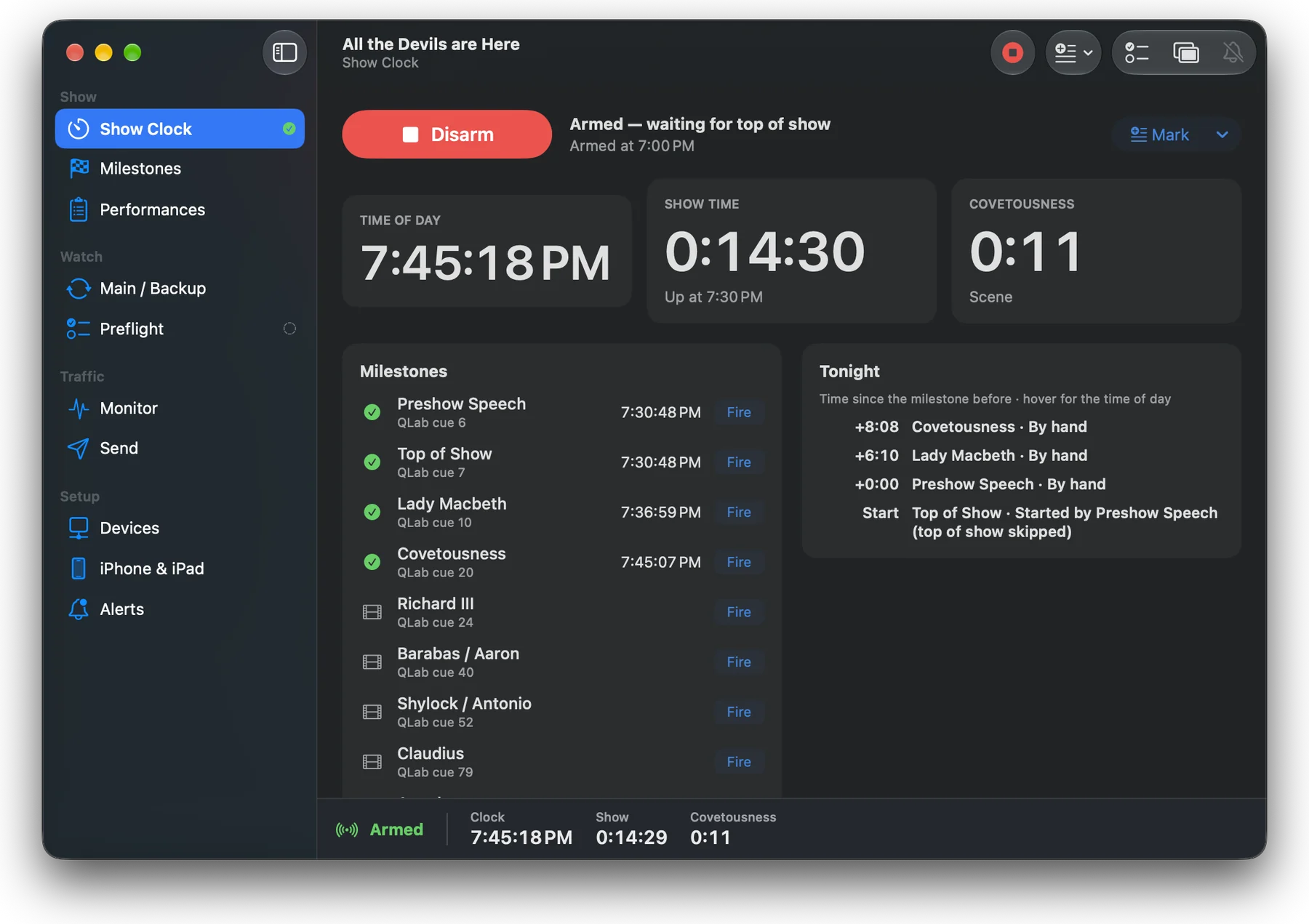
TechDeck Monitor watches the show while you run it. It times every performance from the cues you already run, checks that your main and backup playback machines agree, and puts up a red alert bar the moment a device drops off the show network.
It only talks to the devices you add, so it adds next to no traffic to your network.
Everything the booth and the SM desk need to know
- Show clockArm before places, then milestones from QLab, Eos, MIDI or OSC run the show time, act timers and an intermission countdown.
- No acts? No problemShows without act milestones get Before Intermission and After Intermission timers instead.
- Performance reportsRunning times, act and intermission lengths, holds and the time between milestones. Saved as PDF, CSV or text.
- Main / backup syncMain and backup QLab side by side, or two MIDI feeds that should match, with a grace window you set.
- Dropout alertsA flashing red bar on the Mac, the Clock Display and the stage manager's phone. Never a sound.
- PreflightOne button checks QLab, the console and every MIDI port before the show, and can run itself when you arm.
- Clock DisplayA full-screen clock for a second monitor at the SM desk or in the booth.
- Monitor and SendA live log of every OSC and MIDI message, including MSC and timecode, plus a test sender.
- Remote controlArm, hold, house to half and notes over OSC from the lighting console or QLab.
- Stage manager companionThe free iPhone and iPad app shows the timers and tonight's log, arms the show and takes notes.
Questions
What does TechDeck Monitor do?
It times every performance from the cues you already run, checks that main and backup playback machines agree, and shows a red alert bar when a device drops off the show network.
Can it check QLab main and backup machines?
Yes. It shows main and backup QLab side by side, or two MIDI feeds that should match, and flags them when they disagree for longer than the grace window you set.
Does the dropout alert make a sound?
Never. Alerts are a flashing red bar on the Mac, the Clock Display and the stage manager's phone.
What reports does it make?
Running times, act and intermission lengths, holds and the time between milestones, saved as PDF, CSV or text.
Is there an app for the stage manager?
Yes. The free iPhone and iPad companion shows the timers and tonight's log, arms the show and takes notes.
When is it available?
TechDeck Monitor and its iPhone and iPad companion are coming soon to the App Store.
Private by design
No accounts, no analytics, no tracking. Shows, logs and reports stay on your Mac; phones connect over your own network with an encrypted, paired connection. Privacy policy
TechDeck Monitor is an independent app and is not affiliated with or endorsed by Figure 53 or Electronic Theatre Controls. QLab is a trademark of Figure 53, LLC. ETC and Eos are trademarks of Electronic Theatre Controls, Inc.